
Muslim Pro: Quran Athan Prayer
BitsmediaLifestyle
4.134.52K Reviews
- Version
- Varies With Device
- Installs
- 100.00M
- Age Rating
- Everyone
Screenshots


Our Review of Muslim Pro: Quran Athan Prayer
 Analysis by Appyee
I’d choose a Muslim prayer app by asking one practical question first: do I want a focused tool for a single task, or one place I can return to for several parts of daily practice? Muslim Pro: Quran Athan Prayer is built around the second approach. It is a free lifestyle app from Bitsmedia, and its broad mix of prayer support and religious resources makes it worth considering if you prefer having those tools together rather than juggling several apps.
That breadth is useful, but it also shapes the trade-off. A dedicated prayer-time app may feel simpler if all you need is a reminder, while someone who mainly wants a digital Quran may prefer an app organized around reading. I would start by deciding which task matters most, then judge whether having the other tools close at hand makes the added complexity worthwhile.
What to check before making it your daily tool
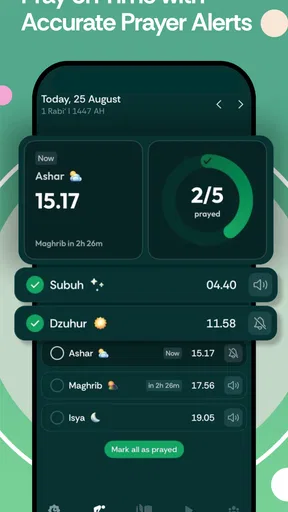
Prayer reminders are only helpful when their timing and sound fit your own routine. I would take a moment after setup to review the location and prayer-time settings, choose a calculation method that matches the guidance you follow, and check which notifications are enabled. That small setup step matters more than the number of features: an alert that arrives at an inconvenient moment or uses a setting you did not intend can quickly become something you dismiss without thinking.
It is also worth considering where you will use the app. At home, you may mainly want a reliable reminder and a quick way to read. On a trip, the Qibla compass and local discovery tools can become more relevant. If you often move between places, check that the location and compass behave as expected in your surroundings instead of assuming that one setup will suit every situation.
Who is likely to get the most from it
I can see this working especially well for someone who wants prayer-time support alongside Quran reading, a Hijri calendar, and practical tools for unfamiliar places. Having these in one app can reduce the little bits of friction that build up when you switch between separate services. The app has a 4.0 average from around 1.9 million ratings, and it has been installed over 100 million times, so it clearly serves a large audience; that popularity is useful context, though it cannot tell you whether its particular settings suit your practice.
The audience rating is Everyone, and the app is free to download, with optional in-app purchases ranging from around fifty cents to about two hundred fifteen dollars per item. I would treat the free starting point as a chance to see whether the daily tools fit your habits before spending anything. If you only need a basic reminder and do not expect to use the Quran or travel-related features, a simpler alternative may be easier to maintain.
How it fits beside narrower alternatives
Compared with using a standalone prayer-time app, Muslim Pro’s appeal is convenience: the prayer schedule sits alongside other resources instead of being the entire experience. Compared with a Quran-first reader, it offers a broader daily toolkit, while a dedicated reading app may be a better match if long reading sessions, study organization, or a minimal screen are your priorities. These are differences in emphasis rather than a simple ranking; the best choice depends on what you will actually open most often.
There is also a practical cost to switching. If you have already built a routine around another app, changing means checking your prayer settings again, re-establishing notification habits, and deciding whether any saved reading progress needs to be carried over manually. I would not replace a setup that is already dependable just for the sake of having more features. Try the app alongside your current routine first, compare the timings and reminders, and switch only if its combined layout genuinely makes your day easier.
One useful way to evaluate it is to give each main area a real job. Use the prayer screen for your everyday schedule, the Quran section when you have a short waiting period, and the Qibla tool only when you need direction somewhere unfamiliar. This keeps the app from turning into a collection of icons you rarely touch and makes it easier to tell whether its breadth is helping you.
First Impressions and Interface
Right off the bat, the first thing you’ll notice about Muslim Pro: Quran Athan Prayer is its clean and intuitive interface. The design is sleek, with a soothing color scheme that feels quite inviting. It's crafted to be user-friendly, even for those who might not be tech-savvy. Navigating through the app is a breeze, thanks to its well-organized layout.
The app’s homepage provides quick access to prayer times, the Quran, and other essential features. Everything is laid out logically, and the icons are easy to understand, which makes the user experience pretty seamless. I didn’t find myself fumbling around trying to figure out where things were, and that's a huge plus in my book.
Features Galore
Now, let’s talk about the features because, honestly, this app is packed with them. First up, the Prayer Times. They are highly accurate, with options to choose from different calculation methods to suit your specific needs. You can even customize the notifications, so you’re always reminded in a way that fits your schedule.
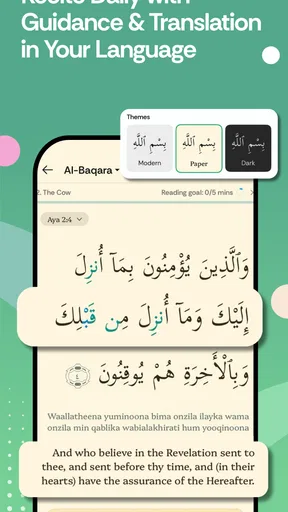
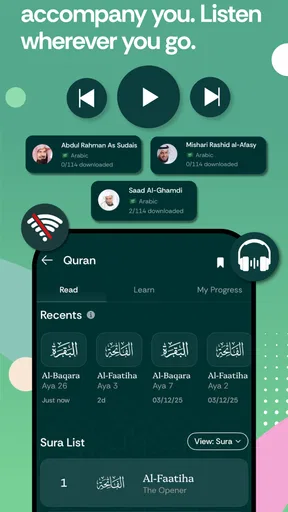
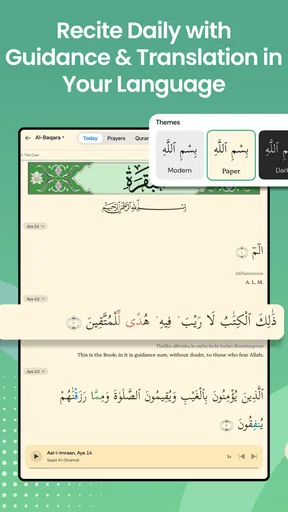
The Quran feature is another standout. With over 40 translations and audio recitations, it’s perfect for those who want to read or listen on the go. The text is clear, and you can easily bookmark your reading or listening progress. It’s like having a Quran in your pocket, which is incredibly convenient.
Additional Goodies
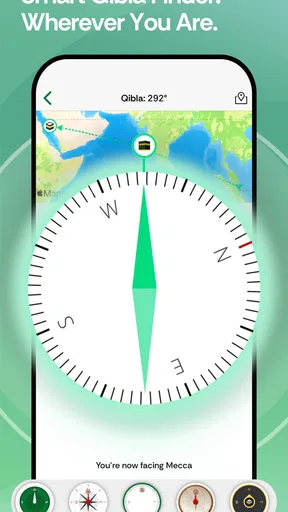
Aside from the basics, Muslim Pro offers a ton of extras. There’s a Qibla compass that’s accurate and responsive, a must-have for anyone traveling. The app also features a Hijri calendar, which is handy for keeping track of Islamic events and holidays.
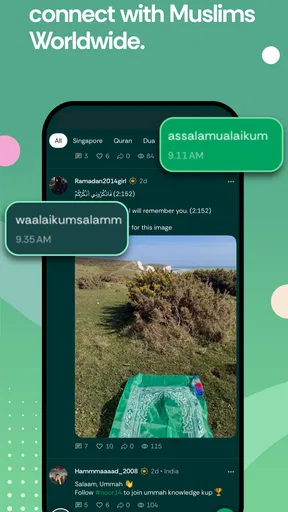
For those who love to learn and share, the app includes daily verses and Islamic greeting cards. It's a nice touch that helps you connect with your faith and community on a more personal level. Plus, the community aspect is bolstered by the app’s ability to connect users with nearby mosques and halal restaurants. It’s like having a local guide wherever you go.
Performance and Reliability
Performance-wise, I found the app to be quite reliable. Even with all its features, it doesn’t lag or crash, which is something you definitely want, especially if you’re relying on it for prayer times. The app updates smoothly and doesn’t hog too much of your phone’s memory, making it a solid choice for everyday use.
The developers seem dedicated to keeping the app up-to-date, which is reassuring. Regular updates mean you’re likely to get improvements and new features over time, keeping the app fresh and functional.
The Final Verdict
So, is Muslim Pro: Quran Athan Prayer worth downloading? In my humble opinion, absolutely. It’s more than just an app; it’s a comprehensive tool that supports you in your daily religious practices and helps you connect with your community.
Whether you’re looking for accurate prayer times, a portable Quran, or a way to find halal spots in a new city, this app has got you covered. Its user-friendly interface and reliable performance make it a must-have for any Muslim looking to integrate technology into their faith journey.
So, go ahead, give it a try. You might just find that it becomes an indispensable part of your daily routine. And hey, if nothing else, it’s a great way to ensure you never miss a prayer again!
A routine that makes the combination useful
Imagine leaving home for work, checking the day’s prayer schedule before you go, then opening the Quran during a quiet break rather than searching for a separate reader. Later, if you are visiting an unfamiliar area, you can use the Qibla compass and look for nearby mosques or halal restaurants. That is the clearest case for this app: each feature has a distinct moment when it can help, and the convenience comes from not having to remember which app handles which task.
A less obvious tip is to make the first few days a calibration period. Check the prayer schedule against the timetable or local guidance you normally trust, and adjust the calculation method if needed. Then test the notification style during ordinary days before relying on it in a busy week. This is not busywork; it helps separate a setting mismatch from an app you simply do not enjoy using.
Small habits that prevent avoidable friction
For reading, bookmarking your place is more useful than relying on memory when you dip into the Quran in short sessions. If you listen while commuting or doing chores, decide in advance whether audio is practical in that setting; a feature is only helpful when it fits your environment and attention. Daily verses and greeting cards can be pleasant extras, but I would treat them as optional touches rather than the reason to keep the app installed.
The Qibla compass deserves a little common sense, too. A compass is most useful when you are somewhere unfamiliar, but nearby metal or an unreliable device reading can make any compass less dependable. If the direction seems wrong, move to a clearer spot and check again rather than treating the first reading as unquestionable. For an important decision, comparing it with a trusted local reference is a sensible safeguard.
Where the all-in-one approach can feel crowded
Putting prayer times, reading, calendar information, discovery, and sharing tools together saves app switching, but it can also mean more choices than a person wants on a quiet home screen. If you only open an app to see the next prayer, the extra sections may feel like clutter. I would not call that a flaw for everyone; it is the natural compromise of a broad lifestyle app. Still, a focused alternative is likely better for someone who wants one clear function and no temptation to browse elsewhere.
Another question is whether the app can replace a source you already rely on. I would compare its prayer schedule with your local mosque’s timetable before making it the sole reference, particularly if your community follows a specific calculation convention. The option to choose among calculation methods is valuable, but it also puts some responsibility on you to select an appropriate one. The same principle applies to local discovery: use nearby listings as a starting point, then verify details that matter before making a special trip.
What to expect before committing
Muslim Pro was released on April 12, 2011, and its long presence in the lifestyle category is one reason many people recognize it. That does not mean every feature will suit every user or that the interface will match your personal preferences. I would install it with a narrow test in mind: set up prayer reminders, read a little, and try the tools you would actually use while traveling. If those tasks feel easy to repeat, the breadth is a genuine benefit; if you keep returning to only one screen, a specialized app may be a better fit.
The main follow-up question is whether a free download means every part of the experience is free. It does not: optional purchases are available, so I would review any purchase prompt carefully and decide whether the item is useful to me before paying. You can begin by judging the everyday essentials rather than assuming you need to buy anything. That makes it easier to distinguish a feature you truly value from an upgrade you might never use.
For people who change phones or prefer to keep their routines portable, it is also sensible to think about setup rather than assuming everything transfers automatically. Keep track of the prayer calculation choice and notification preferences that work for you, so you can recreate them if you reinstall or move to another device. That simple note can save the most frustrating part of switching: having to rediscover why reminders no longer match your usual schedule.
My recommendation
I recommend giving Muslim Pro a try if you want prayer support and Quran access in one place, especially if you travel or appreciate having a Hijri calendar and local resources close by. Its strongest point is not that every extra will matter to everyone, but that the core tools can support different moments of the same day. A little setup and a realistic trial will show whether that convenience is real for you.
I would skip it if your current prayer app already works reliably and you do not want additional sections, or if your priority is a stripped-down reading experience rather than a multi-purpose companion. In those cases, keeping your existing tool or choosing a narrower alternative is a perfectly sensible decision. For everyone else, start with the free experience, check the settings against your needs, and keep only the features that earn a place in your routine.
Verdict
Strengths of Muslim Pro: Quran Athan Prayer
- Comprehensive Quran text with translations.
- Accurate prayer times for any location.
- Daily reminders for prayers and events.
- Beautifully designed user interface.
- Includes Qibla locator feature.
Limitations of Muslim Pro: Quran Athan Prayer
- Contains in-app advertisements.
- Some features require premium access.
- Occasional bugs in older devices.
- Requires internet for full functionality.
- Limited customization options.
Similar Picks in This Category
View All
SmartThings
Samsung Electronics Co., Ltd.4.6

Google Home
Google LLC4.0

Pinterest4.2

Astrotalk - Talk to Astrologer
Astrology & Horoscope4.7

My Verizon
Verizon Consumer Group4.5

Samsung Wallet (Samsung Pay)
Samsung Electronics Co., Ltd.4.1
You May Also Like
View All


Frequently Asked Questions
What features does Muslim Pro: Quran Athan Prayer offer?
Muslim Pro offers a comprehensive suite of features including accurate prayer times based on your location, the complete Quran in Arabic with translations, Qibla direction, an Islamic Hijri calendar, and a collection of Islamic greetings cards. The app also includes audio recitations and phonetics to aid in learning and understanding the Quran.
Is Muslim Pro: Quran Athan Prayer free to use?
Muslim Pro is available as a free app with basic features accessible to all users. However, there is a premium version called Muslim Pro Premium, which offers additional features such as an ad-free experience, more audio recitations, and advanced options for customizing prayer times. Subscriptions are available on a monthly or annual basis.
How accurate are the prayer times in Muslim Pro?
Muslim Pro uses your device's GPS to determine your location and calculates prayer times based on it. The app allows users to select from various calculation methods, making it reliable for different regions. It's recommended to double-check settings and ensure location permissions are enabled for the most accurate results.
Can I use Muslim Pro offline?
Yes, Muslim Pro offers offline access for certain features such as Quran readings and audio recitations. However, for features like prayer time updates, location-based services, and some premium content, an internet connection may be required. It's advisable to download necessary content in advance for offline use.
How does Muslim Pro help with Quran learning?
Muslim Pro facilitates Quran learning by providing translations in multiple languages, audio recitations by renowned reciters, and phonetic transcriptions. These features help users understand and pronounce the verses correctly. Additionally, bookmarks and reading progress features enhance the learning experience by allowing users to track their progress.
